Kubernetes Finalizers Explained for Resources Stuck Terminating
Learn how Kubernetes finalizers work, why resources get stuck in the Terminating state, and how to safely troubleshoot namespaces, PVCs, CRDs, and operators without leaving orphaned infrastructure behind.
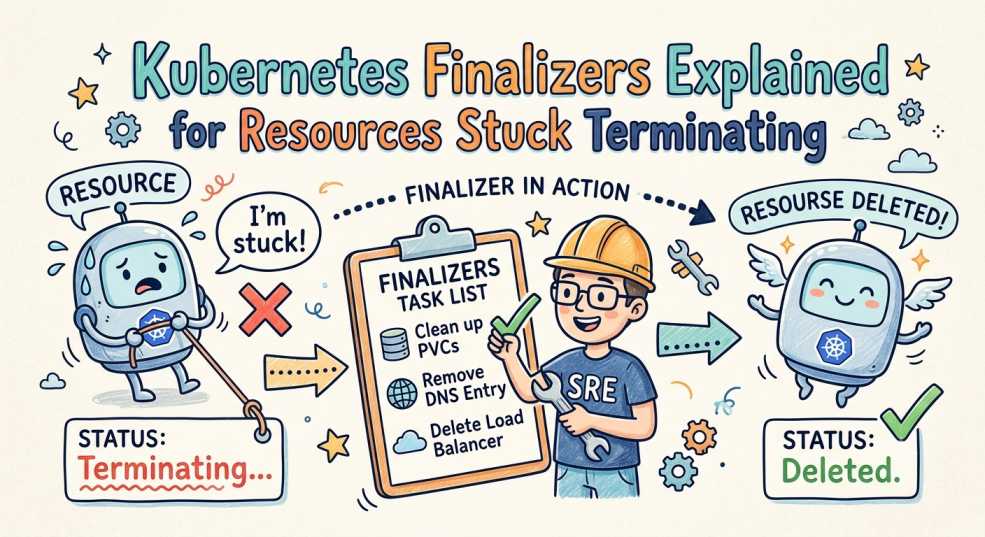
Deleting a Kubernetes resource should be simple.
You run:
kubectl delete namespace developmentYou expect it to disappear within a few seconds.
Instead, the namespace sits there indefinitely with a single frustrating status:
TerminatingMinutes turn into hours.
You restart controllers.
You inspect pods.
Eventually, someone suggests running a command to remove the finalizer manually.
The namespace disappears immediately.
Problem solved.
Or is it?
For many Kubernetes engineers, removing a finalizer becomes a habit long before they understand why it existed in the first place.
The reality is that finalizers are one of Kubernetes' most important safety mechanisms. They prevent infrastructure from disappearing before critical cleanup operations have finished.
Understanding how finalizers work makes troubleshooting stuck namespaces, CRDs, persistent volumes, and cloud resources dramatically easier.
What Actually Happens When You Delete a Kubernetes Resource?
One of the biggest misconceptions is believing that kubectl delete immediately removes an object.
It doesn't.
Instead, Kubernetes begins a controlled deletion lifecycle.
When you execute a delete request, the API server first adds a deletionTimestamp to the object.
The resource still exists.
Controllers can still see it.
New updates are generally rejected while Kubernetes waits for cleanup operations to finish.
Only after every cleanup task completes does Kubernetes permanently remove the object from etcd.
The lifecycle looks like this:
kubectl delete
      │
      ▼
API Server receives request
      │
      ▼
deletionTimestamp added
      │
      ▼
Finalizers executed
      │
      ▼
Cleanup completed
      │
      ▼
Resource removed
That waiting period is exactly where finalizers come into play.
What Are Kubernetes Finalizers?
A finalizer is simply a metadata field attached to a Kubernetes object.
Unlike many Kubernetes features, a finalizer contains no executable code.
It is only a string.
For example:
apiVersion: v1
kind: PersistentVolumeClaim

metadata:
  name: app-storage
  finalizers:
    - kubernetes.io/pvc-protection

spec:
  accessModes:
    - ReadWriteOnce
The presence of this string tells Kubernetes:
"Do not delete this object until the responsible controller confirms cleanup has completed."
The controller watches for resources containing its finalizer.
Once its cleanup work finishes successfully, it removes the finalizer.
Only then can Kubernetes complete the deletion.
Why Finalizers Exist
Infrastructure often extends beyond Kubernetes itself.
Deleting an object inside the cluster may require cleaning resources outside the cluster as well.
Examples include:
| Kubernetes Resource | Cleanup Before Deletion |
|---|---|
| PersistentVolumeClaim (PVC) | Verify the storage volume is no longer attached. |
| LoadBalancer Service | Delete the associated cloud load balancer. |
| Custom Resource (CR) | Remove any external infrastructure or dependencies. |
| Certificate | Revoke or clean up certificates before deletion. |
| Database Operator | Complete backups or gracefully shut down the database. |
Without finalizers, Kubernetes could delete objects while leaving expensive cloud resources, storage volumes, or DNS records running indefinitely.
Finalizers exist to prevent orphaned infrastructure.
Why Namespaces Get Stuck in Terminating
One of the most searched Kubernetes problems is:
Namespace Stuck Terminating
A namespace cannot disappear until every resource inside it has been successfully removed.
That includes:
- Pods
- Services
- Secrets
- Persistent Volumes
- Custom Resources
- Finalizers
Even if hundreds of resources are deleted successfully, a single unfinished finalizer can stop the entire namespace.
The dependency chain looks like this:
Namespace
│
├── Pods ✓
│
├── Services ✓
│
├── PVC ✓
│
├── Custom Resource ✗
│
└── Finalizer waiting
│
▼
Namespace remains
"Terminating"
This is why deleting a namespace rarely fixes the issue until the underlying cleanup issue is resolved.
Finalizers vs ownerReferences
Many engineers confuse ownerReferences with finalizers, but they solve completely different problems.
| ownerReferences | Finalizers |
|---|---|
| Defines parent-child relationships | Controls deletion timing |
| Used by Kubernetes Garbage Collector | Used by controllers |
| Automatically removes dependent resources | Delays deletion until cleanup finishes |
| Handles cascading deletion | Handles external cleanup |
Think of it this way:
An ownerReference tells Kubernetes what should be deleted.
A finalizer tells Kubernetes when deletion is allowed.
Both work together during the deletion lifecycle.
How the Kubernetes Garbage Collector Works
Kubernetes includes an internal Garbage Collector responsible for removing dependent resources automatically.
For example:
Deployment
    │
    ▼
ReplicaSet
    │
    ▼
Pods
Deleting the Deployment eventually removes the ReplicaSet and Pods as well.
However, the Garbage Collector always checks for finalizers before deleting an object.
If a finalizer still exists, deletion pauses until the responsible controller removes it.
This coordination prevents infrastructure inconsistencies while still allowing automatic cleanup.
Custom Resource Definitions and Finalizers
Finalizers become especially important when working with Kubernetes Operators and Custom Resource Definitions (CRDs).
Many operators create external infrastructure, such as:
- Cloud databases
- Object storage
- DNS records
- Kafka clusters
- Managed Kubernetes clusters
A typical custom resource might include:
apiVersion: database.example.com/v1
kind: Database

metadata:
  name: production-db
  finalizers:
    - database.example.com/finalizer

spec:
  engine: postgres
  version: "16"
When the Database resource is deleted, the operator first destroys the external database.
Only after confirming successful cleanup does it remove the finalizer.
Without this mechanism, production databases could remain active and continue generating cloud costs even after Kubernetes believes they have been deleted.
How to Safely Remove a Finalizer
Sometimes cleanup controllers fail.
Before removing a finalizer manually, inspect the resource first.
kubectl get namespace development -o yamlLocate the finalizers field.
If you fully understand the consequences and the cleanup has already been completed, you can remove it.
kubectl patch namespace development \
  --type=json \
  -p='[
    {
      "op": "remove",
      "path": "/spec/finalizers"
    }
  ]'
Manual removal should always be the last option.
Deleting a finalizer without understanding why it exists can leave orphaned cloud infrastructure, storage volumes, or external services behind.
Common Reasons Finalizers Never Complete
Most stuck resources are caused by one of these issues:
| Cause | Result |
|---|---|
| Controller crashed | Cleanup process never executes. |
| Missing RBAC permissions | Controller cannot remove the resource or clear the finalizer. |
| Cloud API unavailable | External infrastructure cannot be deleted successfully. |
| Operator removed first | No controller remains to remove the finalizer. |
| Network failure | Cleanup operation never completes. |
Identifying the failing controller is usually more valuable than immediately removing the finalizer.
Why AI-Generated Kubernetes YAML Can Make This Worse
AI tools have become extremely effective at generating Kubernetes manifests.
However, they often focus on creating resources, not deleting them safely.
It's common to see AI-generated troubleshooting advice that recommends immediately removing finalizers whenever a namespace becomes stuck.
That may solve the Kubernetes symptom.
It does not solve the infrastructure problem.
If the finalizer was protecting a cloud load balancer, persistent disk, or managed database, forcing deletion could leave expensive resources running unnoticed.
AI can accelerate Kubernetes operations, but engineers still need to understand the lifecycle behind the manifests they deploy.
Best Practices for Working with Finalizers
Following a few simple practices can prevent many production issues:
- Investigate why a finalizer exists before removing it.
- Monitor namespaces that remain in Terminating for extended periods.
- Keep Operators and controllers healthy so cleanup completes successfully.
- Test deletion workflows when developing Custom Resource Definitions.
- Regularly audit custom finalizers across production clusters.
Finalizers should be treated as part of your application's lifecycle, not as an obstacle to deletion.
Conclusion
Most Kubernetes resources don't become stuck because Kubernetes is broken.
They become stuck because Kubernetes is waiting for someone to finish the work required to safely remove them.
Finalizers ensure storage is detached, cloud infrastructure is destroyed, databases are cleaned up, and external dependencies are handled before deletion completes.
Once you understand that process, a resource sitting in Terminating stops being a mystery and becomes a predictable part of Kubernetes' reconciliation model.
Instead of immediately asking,
"How do I remove this finalizer?"
start asking the better question:
"What cleanup is Kubernetes still protecting?"
"The safest Kubernetes resource isn't the one that deletes the fastest; it's the one that leaves nothing behind."