Under the Hood #3 How systemd Actually Starts Services Before Docker and Kubernetes
Discover how systemd actually starts Linux services before Docker and Kubernetes. Learn unit files, dependencies, restart policies, service lifecycle, and real-world troubleshooting techniques that every DevOps and Platform Engineer should understand.
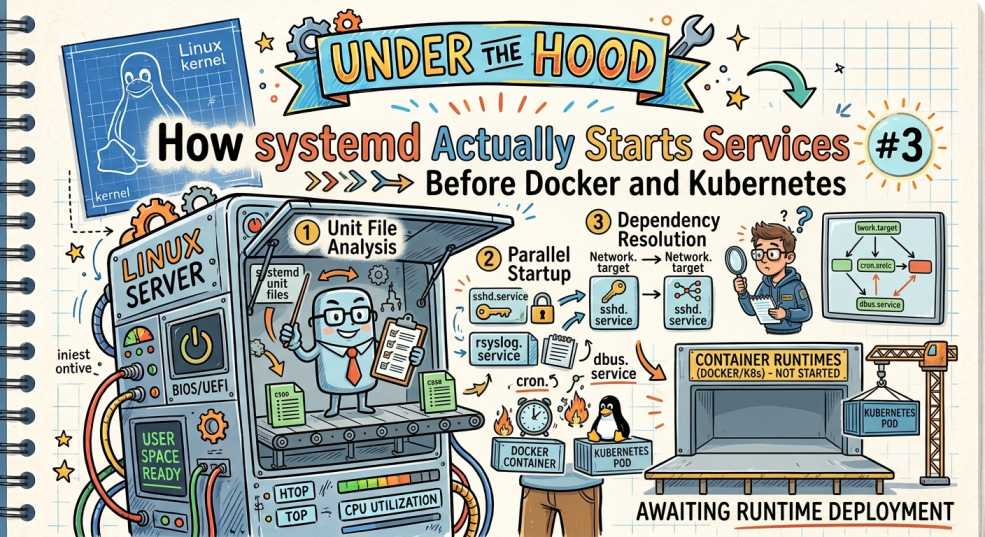
In the previous article of the Under the Hood series, we followed the Linux boot process from the moment you press the power button until a Kubernetes node finally becomes Ready. Along the way, we saw how the firmware initializes hardware, GRUB loads the Linux kernel, initramfs mounts the root filesystem, and systemd becomes the first userspace process.
But that raises another question.
Every day, engineers run commands like:
systemctl start nginx
systemctl restart kubelet
systemctl status docker
The commands feel almost instant. A service starts, stops, or restarts, and we move on.
What actually happens after you press Enter?
How does Linux know which binary to execute? How does it decide what must start first? Why does one failed service sometimes prevent several others from starting? And how does systemd ensure that Docker, containerd, kubelet, networking, and dozens of other services come online in the correct order during boot?
These questions matter because systemd isn't just another utility it's the process responsible for bringing almost the entire operating system to life. When services fail to start, boot takes too long, or a Kubernetes node remains unhealthy, the root cause often lies inside systemd rather than Docker or Kubernetes.
In this article, we'll follow a single systemctl start command from your terminal to the moment the application is actually running. Along the way, we'll explore unit files, dependencies, process management, restart policies, logging, and why understanding systemd is one of the most valuable Linux skills for DevOps and Platform Engineers.
The Common Misconception
Ask someone what happens when they run:
systemctl start nginxYou'll often hear something like:
"systemd just starts NGINX."
That isn't wrong, but it leaves out almost everything important.
Starting a service isn't the same as launching a binary.
Before systemd executes a single command, it has to answer several questions:
- Does the service even exist?
- Does it depend on another service?
- Is networking available?
- Has the filesystem been mounted?
- Is another instance already running?
- Should the service restart automatically if it crashes?
Only after those checks succeed does systemd actually execute the application.
The sequence is much closer to this:
systemctl start nginx
          │
          ▼
systemd receives request
          │
          ▼
Read Unit File
          │
          ▼
Resolve Dependencies
          │
          ▼
Start Required Services
          │
          ▼
Launch Process
          │
          ▼
Monitor Service
          │
          ▼
Report Status
This is why systemd is often described as a service manager, not simply a process launcher.
It doesn't just start applications; it manages their entire lifecycle.
And because nearly every modern Linux distribution relies on systemd, the same mechanism starts your SSH server, database, Docker daemon, container runtime, and even kubelet itself.
Understanding how this works makes troubleshooting far easier because you stop thinking of services as isolated programs and start seeing them as part of a dependency graph managed by systemd.
systemd Unit Files: The Blueprint Behind Every Service
Once systemd receives your request, the first thing it does isn't launch the application. Instead, it looks for a unit file.
A unit file is simply a configuration file that tells systemd how a service should run. Think of it as a blueprint. Without it, systemd has no idea what program to start, when it should start, what it depends on, or what should happen if it crashes.
When you execute:
systemctl start nginxsystemd immediately searches for a unit named:
nginx.serviceMost service unit files are stored in locations such as:
/etc/systemd/system/
/usr/lib/systemd/system/
/lib/systemd/system/
Once the file is found, systemd reads its configuration before making any decisions.
A simplified service file might look like this:
[Unit]
Description=NGINX Web Server
After=network.target

[Service]
ExecStart=/usr/sbin/nginx
Restart=always

[Install]
WantedBy=multi-user.target
Although this file is only a few lines long, it contains almost everything systemd needs to know.
- Description gives the service a human-readable name.
- After tells systemd that networking must already be available before NGINX starts.
- ExecStart specifies the exact command that should be executed.
- Restart defines what should happen if the process exits unexpectedly.
- WantedBy determines when the service should automatically start during boot.
This is why you rarely start applications directly in production. Instead of running the binary yourself, you let systemd manage it through a unit file that defines its complete lifecycle.
Services Are Only One Type of Unit
One of the biggest misconceptions is that systemd only manages services.
In reality, everything systemd manages is called a unit, and services are just one category.
Some of the most common unit types are:
| Unit Type | Purpose |
|---|---|
.service |
Runs applications and background daemons. |
.socket |
Starts services automatically when network connections arrive. |
.target |
Groups multiple units together, similar to traditional Linux runlevels. |
.mount |
Mounts and manages filesystems. |
.timer |
Schedules recurring tasks, similar to cron jobs. |
.path |
Monitors files or directories and triggers actions when they change. |
For example:
nginx.service
docker.service
containerd.service
kubelet.service
are all service units.
Meanwhile,
network.target
multi-user.target
are target units that group together multiple services during boot.
This flexibility is one of the reasons systemd replaced older init systems. Instead of treating everything as a startup script, it manages different types of resources using a common framework.
Dependency Resolution: Why Services Don't Start Randomly
Imagine trying to start kubelet before networking exists.
It wouldn't be able to reach the Kubernetes API server.
Now imagine starting Docker before the filesystem containing its data directory is mounted.
That would fail too.
This is exactly why systemd doesn't simply execute services in the order it receives them.
Instead, it builds a dependency graph.
Consider this simplified example:
kubelet.service
        │
        ▼
containerd.service
        │
        ▼
network.target
        │
        ▼
local-fs.target
When you start kubelet, systemd first checks whether every required dependency is already active.
If networking isn't available yet, it starts networking first.
If the container runtime isn't running, it starts containerd before kubelet.
Only when all required dependencies are satisfied does systemd finally launch kubelet itself.
This dependency-based approach makes Linux far more reliable than older init systems, where startup order was often controlled by numbered shell scripts that were difficult to maintain and troubleshoot.
Wants vs Requires: One Word, Huge Difference
Two of the most important directives inside a unit file are Wants= and Requires=.
At first glance, they look almost identical, but they behave very differently.
Requires=
This creates a hard dependency.
If the required service fails, the current service won't start either.
For example:
Requires=containerd.serviceIf containerd is unavailable, kubelet also fails because it cannot function without a container runtime.
Wants=
This creates a soft dependency.
systemd will try to start the other service, but failure doesn't necessarily stop the current one.
For example:
Wants=network-online.targetIf that unit doesn't start successfully, systemd may still continue depending on the rest of the configuration.
Think of it like this:
- Requires means "I cannot function without this."
- Wants means "I'd prefer this to be running, but I might still continue."
Understanding this distinction is invaluable when diagnosing startup failures. Two services may appear related, yet only one is actually preventing the other from running.
Ordering Services with After and Before
So far, we've seen that Requires= and Wants= define what a service depends on.
But there's another question systemd has to answer:
In what order should these services start?
That's where After= and Before= come in.
A common misunderstanding is that After= creates a dependency.
It doesn't.
It simply controls the startup order.
Consider this example:
[Unit]
After=network.target
This tells systemd:
"Don't start me until network.target has finished starting."It does not mean networking must exist. If you want that guarantee, you'd combine it with Requires= or Wants=.
Similarly,
Before=nginx.servicemeans:
"Start this unit before NGINX."
Think of dependencies and ordering as two separate questions.
- Requires/Wants answer: Do I need this service?
- After/Before answer: When should it start?
Keeping these concepts separate allows systemd to build a startup sequence that's both reliable and efficient.
ExecStart: The Moment Your Application Actually Runs
Up until now, systemd hasn't executed your application.
It's been reading unit files, resolving dependencies, checking startup order, and making sure everything is ready.
Only now does it reach the most important directive:
ExecStart=/usr/sbin/nginxThis tells systemd the exact command it should execute.
The sequence now looks like this:
systemctl start nginx
        │
        ▼
Read Unit File
        │
        ▼
Check Dependencies
        │
        ▼
Determine Startup Order
        │
        ▼
Execute ExecStart
        │
        ▼
NGINX Running
For a simple service like NGINX, ExecStart launches the web server.
For Kubernetes, it might look something like:
ExecStart=/usr/bin/kubeletFor Docker:
ExecStart=/usr/bin/dockerdEvery service has its own executable, but systemd always follows the same process before launching it.
This consistency is one of the reasons Linux systems remain predictable, even when managing hundreds of services.
It's Not Just About Starting Services
Starting a process is actually the easiest part of systemd's job.
The real value comes after the application begins running.
Imagine you manually start NGINX like this:
nginxIf the process crashes a minute later, nothing automatically brings it back.
Now compare that with a service managed by systemd.
The unit file might contain:
Restart=alwaysNow the lifecycle looks like this:
Start Service
      │
      ▼
Application Running
      │
      ▼
Application Crashes
      │
      ▼
systemd Detects Exit
      │
      ▼
Restart Service
Instead of simply launching the process and forgetting about it, systemd continuously monitors it.
This is why systemd is often described as a process supervisor.
Its job doesn't end when the application starts; it continues managing the service for as long as the operating system is running.
Restart Policies: One of systemd's Most Powerful Features
Production services fail.
Processes crash.
Applications run out of memory.
Configuration errors happen.
Rather than requiring an administrator to manually restart every failed service, systemd can handle many failures automatically.
Some common restart policies include:
| Restart Policy | Behavior |
|---|---|
no |
Never restarts the service after it exits. |
on-failure |
Restarts the service only if it exits with an error or crashes unexpectedly. |
always |
Always restarts the service, regardless of how it exited. |
on-abnormal |
Restarts the service only after abnormal termination, such as a crash or fatal signal. |
For example:
Restart=on-failureIf the application exits unexpectedly, systemd immediately attempts to start it again.
This is one of the reasons services like containerd, Docker, and kubelet recover automatically after temporary failures without requiring manual intervention.
Of course, automatic restarts don't solve every problem. If a service crashes repeatedly because of a bad configuration or missing dependency, restarting it over and over won't fix the underlying issue.
That's why experienced engineers don't just check whether a service restarted; they investigate why it restarted in the first place.
Why Docker and Kubernetes Depend on systemd
By now, a pattern should be becoming clear.
Docker doesn't start itself.
containerd doesn't start itself.
kubelet doesn't start itself.
systemd starts all of them.
On a Kubernetes worker node, the startup chain often looks like this:
systemd
      │
      ▼
containerd.service
      │
      ▼
kubelet.service
      │
      ▼
Kubernetes API Server
      │
      ▼
Pods Scheduled
If containerd.service fails, kubelet can't create containers.
If kubelet never starts, the node won't register with the cluster.
From Kubernetes' perspective, the node simply appears as NotReady.
But the real problem isn't Kubernetes.
It started much earlier inside systemd.
This is why experienced SREs and Platform Engineers often begin debugging with:
systemctl status kubeletrather than immediately investigating Pods or Deployments.
Understanding systemd allows you to trace failures back to their true origin instead of only seeing their symptoms.
How Production Engineers Troubleshoot systemd
When a service refuses to start, many engineers immediately reinstall packages, reboot the server, or start changing configuration files.
Experienced Linux engineers take a much more systematic approach.
Instead of asking:
"Why isn't NGINX running?"
they ask:
"Which stage of systemd's lifecycle failed?"
That small change in mindset usually leads to the answer much faster.
A typical investigation follows this order.
Step 1: Check the Service Status
The first command is almost always:
systemctl status nginxThe output immediately tells you several useful things:
- Is the service currently running?
- Did it exit successfully?
- When did it last start?
- Is systemd trying to restart it?
- What was the exit code?
Many issues can be identified from this command alone.
Step 2: Read the Logs
If the status output isn't enough, the next stop is the systemd journal.
journalctl -u nginxUnlike traditional log files scattered across different directories, the systemd journal keeps service logs in one place.
You might discover errors such as:
- Missing configuration files
- Permission denied
- Port already in use
- Missing environment variables
- Failed dependency
When investigating boot problems, you can even inspect logs from the current boot only:
journalctl -bThis is often one of the fastest ways to understand why a machine or service failed during startup.
Step 3: Verify Dependencies
Sometimes the service itself is perfectly fine.
The real problem is something it depends on.
For example:
kubelet.service
        │
        ▼
containerd.service
        │
        ▼
network.target
If containerd never starts, kubelet won't either.
Instead of debugging Kubernetes immediately, check whether the dependency is healthy.
systemctl status containerdUnderstanding dependencies prevents you from fixing symptoms while missing the actual root cause.
Step 4: Check Whether systemd Is Restarting the Service
Sometimes you'll notice a service appears to start successfully but keeps disappearing.
Running:
systemctl status nginxmight show something like:
Active: activating (auto-restart)This tells you systemd is doing exactly what you asked it to do: it keeps restarting a service that's repeatedly crashing.
At this point, the restart policy isn't the problem.
The application itself is.
A Real Production Investigation
Imagine a Kubernetes worker node suddenly disappears from the cluster.
Running:
kubectl get nodesshows:
worker-02 NotReadyMany engineers immediately begin investigating Pods, Deployments, or the control plane.
An experienced engineer starts much lower.
First:
systemctl status kubeletThe output shows:
Failed to start kubelet.serviceInstead of blaming Kubernetes, they inspect the dependency:
systemctl status containerdThis time, containerd has also failed.
Checking the logs reveals the real issue:
journalctl -u containerdThe journal reports that the container storage partition couldn't be mounted during boot.
Suddenly, the picture becomes clear.
The problem wasn't Kubernetes.
It wasn't kubelet.
It wasn't even containerd.
A storage issue prevented containerd from starting, which prevented kubelet from starting, which left the node in a NotReady state.
This is exactly why understanding systemd is so valuable. It helps you follow failures back to their source instead of stopping at the first visible symptom.
Common Mistakes
Even experienced engineers occasionally misunderstand how systemd works. Here are some of the most common pitfalls.
Mistake 1: Treating systemctl start Like Running a Binary
Many people assume systemctl start nginx is equivalent to running the NGINX executable directly.
It isn't.
systemd first reads the unit file, resolves dependencies, determines startup order, applies restart policies, and only then launches the process.
Mistake 2: Ignoring the Unit File
When a service behaves unexpectedly, engineers often edit the application's configuration but never inspect the service definition itself.
In many cases, the issue is inside the unit file: an incorrect ExecStart, a missing dependency, or an unsuitable restart policy.
Mistake 3: Looking Only at Application Logs
Application logs explain why an application failed.
systemd logs explain why the application never started in the first place.
Commands like:
journalctl -u kubeletor
journalctl -boften provide the missing piece of the puzzle.
Mistake 4: Assuming Services Start Sequentially
Modern Linux doesn't simply start Service A, then Service B, then Service C.
systemd builds a dependency graph and starts independent services in parallel whenever possible, significantly reducing boot time.
Understanding those dependencies makes troubleshooting much easier.
Key Takeaways
systemd is far more than a tool for starting services. It's the process manager responsible for bringing the operating system to life and keeping critical applications running.
Keep these principles in mind:
- Every managed application is defined by a unit file.
Requires=andWants=define dependencies.After=andBefore=control startup order.ExecStart=specifies the command to execute.- Restart policies help recover from unexpected failures.
systemctlandjournalctlare the first tools you should reach for during troubleshooting.- Docker, containerd, kubelet, databases, web servers, and most production services rely on systemd.
Once you understand how systemd thinks, diagnosing service failures becomes far more methodical and much less dependent on trial and error.
Conclusion
Most engineers interact with systemd every day without thinking much about it. They start services, restart daemons, or check service status, but the work systemd performs behind the scenes is far more sophisticated than simply launching a process.
Every systemctl start command sets off a chain of events. systemd reads unit files, resolves dependencies, determines startup order, launches the application, monitors its health, collects logs, and restarts it if necessary. That orchestration is what allows modern Linux systems to boot reliably and keep critical services running.
Understanding systemd also changes the way you troubleshoot. Instead of treating Docker, containerd, kubelet, or NGINX as isolated applications, you begin to see them as services managed within a larger dependency graph. Following that graph often leads you to the real root cause much faster than chasing symptoms.
The next time a service refuses to start, don't just ask, "Why did this application fail?"
Ask:
"What is systemd trying to tell me?"
More often than not, the answer is already there; you just need to know where to look.
Next in the Under the Hood Series
Under the Hood #4: Understanding cgroups v2: The Technology That Makes Containers Possible
Docker and Kubernetes couldn't exist without control groups (cgroups). In the next article, we'll explore how Linux limits CPU, memory, I/O, and processes, why OOMKilled happens, and how Kubernetes uses cgroups v2 to isolate workloads. By the end, you'll understand the Linux feature that quietly powers every modern container.