NVIDIA OpenShell: Why Your AI Agent Needs a Cage, Not a Crown
What if your AI agent had root access? Discover how NVIDIA OpenShell secures AI with sandboxing, isolation, and strict policy-driven execution control.
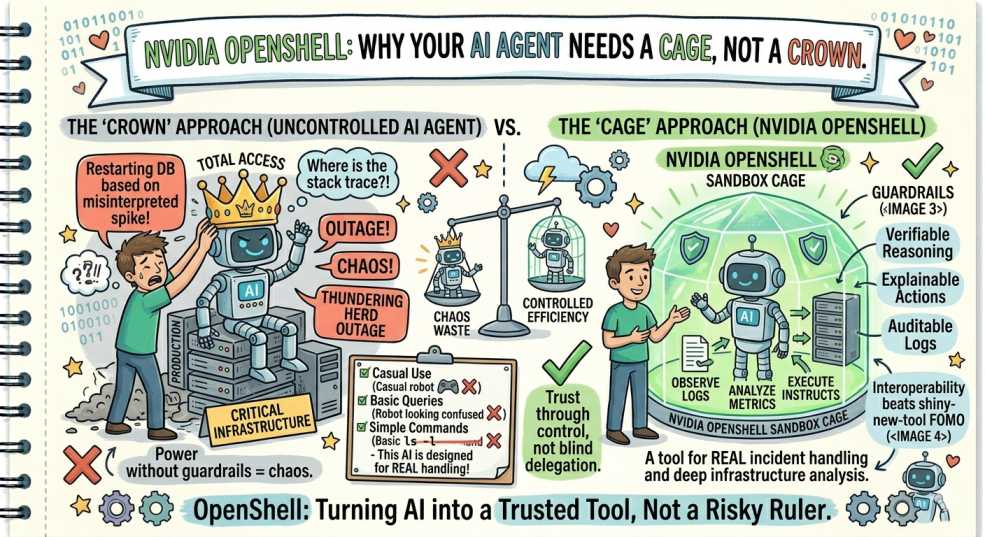
Following our "From Pipelines to Prompts" series, we’ve analyzed the latest release from NVIDIA GTC 2026. Here is the breakdown of why OpenShell is the security boundary your agentic workflows have been missing.
Let’s do a quick reality check.
Right now, your AI agent probably:
- Can read your
~/.sshkeys - Has access to cloud credentials
- Can modify local code
- And can freely talk to the internet
That’s not automation.
That’s unrestricted execution with a personality layer on top.
And if something goes wrong, a bad prompt, compromised model, or supply-chain injection, you’re not debugging anymore.
You’re handling a production-grade incident from your own terminal.
From Smart Assistant → Untrusted Actor
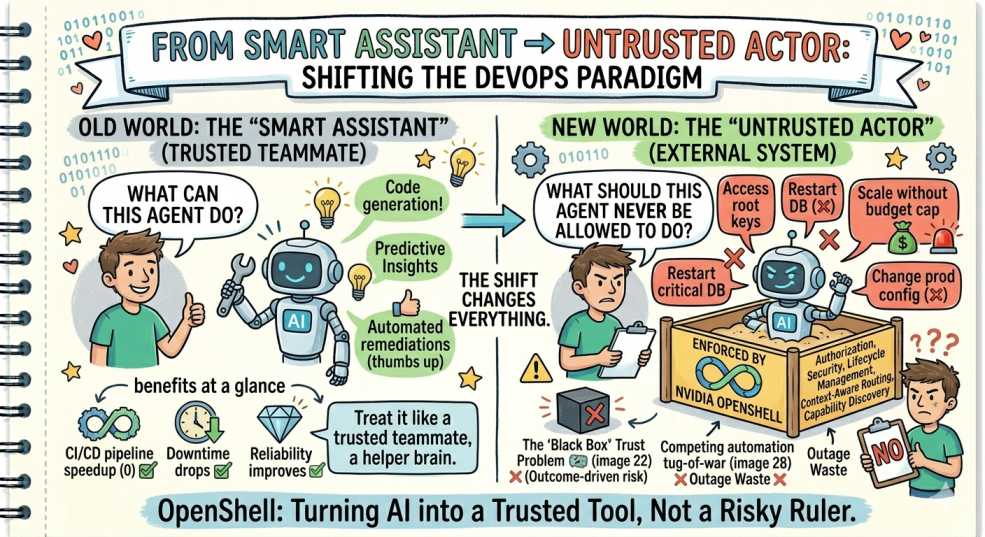
At DevOps Inside, one idea is becoming very clear:
The moment an AI can act, it must be treated like an external system, not a trusted teammate.
That shift changes everything.
We’re no longer asking:
- “What can this agent do?”
We’re asking:
- “What should this agent NEVER be allowed to do?”
That’s exactly where NVIDIA OpenShell enters.
What OpenShell Actually Solves
Unveiled at NVIDIA GTC 2026, OpenShell introduces something DevOps has needed for a while:
👉 A true security boundary for AI agents
Not guidelines.
Not prompts.
Not “please behave” instructions.
Actual kernel-level enforcement.
Built in Rust and released under Apache 2.0, OpenShell treats AI agents for what they really are:
Untrusted programs with unpredictable behavior
The Core Idea: Enforce, Don’t Request
Traditional AI safety relies on:
- Prompt rules
- Tool restrictions
- Hope
OpenShell flips that model completely.
It operates on a simple principle:
If it’s not explicitly allowed, it doesn’t exist.
1. Filesystem Isolation (No Means No)
Instead of exposing your system and hoping the agent behaves, OpenShell restricts visibility at the kernel level.
Using Linux security modules ensures:
- Only approved directories are visible
- Everything else appears nonexistent
What this changes:
Even if an agent tries to explore sensitive paths, it doesn’t get blocked—it gets nothing.
No access. No signal. No leak.
2. Network Control That Can’t Be Bypassed
Most setups rely on firewalls or API restrictions.
OpenShell goes deeper:
- Blocks unsafe system calls
- Forces all traffic through controlled channels
Result:
Your agent can’t just open random connections or “get creative” with networking.
3. Policy-Driven Outbound Access
Every external request passes through a policy layer.
You define:
- Which services are allowed
- Which endpoints are trusted
- What kind of traffic is acceptable
Example shift:
Instead of:
“Let the agent access the internet.”
You define:
“Allow package downloads from trusted sources. Block everything else.”
4. Isolation Without Infrastructure Headache
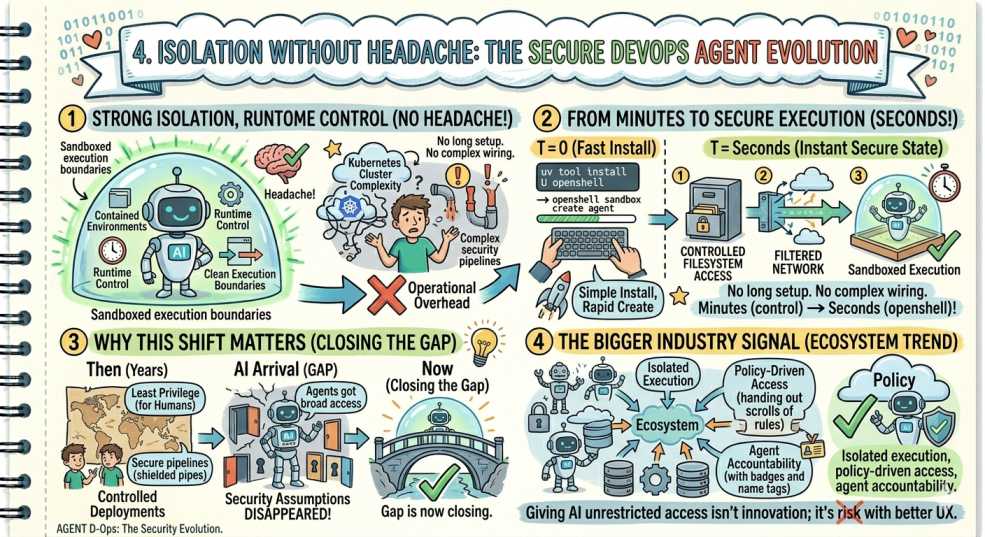
Here’s the clever part.
OpenShell gives you:
- Strong isolation
- Runtime control
- Clean execution boundaries
Without forcing you to manage:
- Full Kubernetes clusters
- Complex security pipelines
You get contained environments without operational overhead.
From Minutes to Secure Execution
Setup is intentionally simple:
uv tool install U openshell
openshell sandbox create agent
Within seconds:
- Filesystem access is controlled
- Network is filtered
- Execution is sandboxed
No long setup. No complex wiring.
Why This Shift Matters
For years, DevOps focused on:
- Least privilege for humans
- Secure pipelines
- Controlled deployments
Then AI arrived, and suddenly:
- Agents got broad access
- Security assumptions disappeared
- Guardrails became optional
That gap is now closing.
The Bigger Industry Signal
This isn’t a niche tool.
The entire ecosystem is moving toward:
- Isolated execution
- Policy-driven access
- Agent accountability
Because the truth is simple:
Giving AI unrestricted access isn’t innovation; it’s risk with better UX.
🛡️ DevOps Inside Insight
The real power of OpenShell isn’t just restriction.
It’s precision.
You move from:
- Blocking entire systems
To:
- Allowing specific actions under defined conditions
That’s how modern systems stay secure:
Not by limiting capability, but by controlling intent at execution time.
Final Thoughts
We spent years learning:
- Don’t run services as root
- Don’t expose secrets
- Don’t trust unknown binaries
Then AI showed up, and we ignored all three.
OpenShell is the reset.
💬 Quick Question: Are you ready to sandbox your AI agent, or are you still letting it operate with production-level access?
“If your AI agent has root access, it’s not helping you ship faster; it’s just one bad prompt away from deploying chaos.”